


Page 81 - DJML Annual Report 24-25
P. 81
DJ MEDIAPRINT & LOGISTICS LIMITED
                                           CORPORATE OVERVIEW     STATUTORY REPORTS     FINANCIAL STATEMENTS

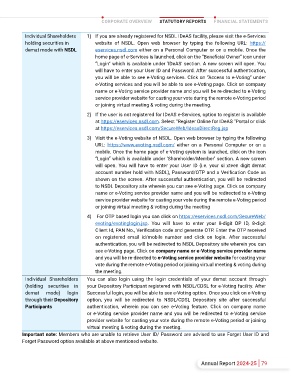
    In  order  to  increase  the  efficiency  of  the  voting     I  ter  of  SEBI  circular  no.  SEBI/HO/CFD/CMD/  Individual Shareholders   1)  If you are already registered for NSDL IDeAS facility, please visit the e-Services
 process, pursuant to a public consultation, it has been   CIR/P/2020/242 dated December 9, 2020  on  holding securities in   website  of  NSDL.  Open  web  browser  by  typing  the  following  URL:  https://
 decided to enable e-voting to all the demat account   e-Voting  fa  provided  b  Listed  Companies,   demat mode with NSDL  eservices.nsdl.com either on a Personal Computer or on a mobile. Once the
 holders, by way of a single login credential, through   Individua   shareholder   holding   securitie      home page of e-Services is launched, click on the “Beneficial Owner” icon under
 their demat accounts/ websites of Depositories/  dema  mode  are  allowed  to  vote  throug  their   “Login” which is available under ‘IDeAS’ section. A new screen will open. You
 Depository Participants.  Dema  acco  holder   dema  accoun  maintained    Depositorie  and   will have to enter your User ID and Password. After successful authentication,
 would  be  able  to  ca  their  vote  witho  having   Depositor  Participants.  Shareholder  are  advised   you will be able to see e-Voting services. Click on “Access to e-Voting” under
 to  register  aga    the  ESPs,  thereby,  no  o   to  update  their  mobile  number  and  ema  Id    their   e-Voting services and you will be able to see e-Voting page. Click on company
 facilitating  seamle  authenticatio  b  also   dema  account    order  to  acce  e-Voting  facility.  name or e-Voting service provider name and you will be re-directed to e-Voting
 enhancing  ease  and  convenience  of  participating        Pursua  to  abovesaid  SEBI  Circular,  Login   service provider website for casting your vote during the remote e-Voting period
 e-voting  process.
 method  for  e-Voting  and  joining  virtual  meetings   or joining virtual meeting & voting during the meeting.
 Step 1:  Acce  throug  Depositorie  CDSL/NSDL   for  Individual  shareholders  holding  securities  in   2)  If the user is not registered for IDeAS e-Services, option to register is available
 e-Voting  syste    case  of  individua  shareholder   Demat mode CDSL/NSDL is given below:  at https://eservices.nsdl.com. Select “Register Online for IDeAS “Portal or click
 holding  share    dema  mode.          at https://eservices.nsdl.com/SecureWeb/IdeasDirectReg.jsp

                                     3)  Visit the e-Voting website of NSDL. Open web browser by typing the following
 Type of shareholders   Login Method
                                        URL:  https://www.evoting.nsdl.com/  either  on  a  Personal  Computer  or  on  a
 Individual Shareholders   1)  Users who have opted for CDSL Easi / Easiest facility, can login through their   mobile. Once the home page of e-Voting system is launched, click on the icon
 holding securities in   existing user id and password. Option will be made available to reach e-Voting   “Login” which is available under ‘Shareholder/Member’ section. A new screen
 Demat mode with CDSL  page without any further authentication. The users to login to Easi / Easiest are   will  open.  You  will  have to  enter your  User ID (i.e. your  si xteen digit demat
 requested to visit CDSL website www.cdslindia.com and click on login icon &   account number hold with NSDL), Password/OTP and a Verification Code as
 My Easi New (Token) Tab.               shown on the screen. After successful authentication, you will be redirected
                                        to NSDL Depository site wherein you can see e-Voting page. Click on company
 2)  After successful login the Easi / Easiest user will be able to see the e-Voting   name or e-Voting service provider name and you will be redirected to e-Voting
 option  for  eligible  companies  where  the  evoting  is  in  progress  as  per  the   service provider website for casting your vote during the remote e-Voting period
 information provided by company. On clicking the evoting option, the user will   or joining virtual meeting & voting during the meeting
 be able to see e-Voting page of the e-Voting service provider for casting your   4)   For OTP based login you can click on https://eservices.nsdl.com/SecureWeb/
 vote during the remote e-Voting period or joining virtual meeting & voting during   evoting/evotinglogin.jsp.  You  will  have  to  enter  your  8-digit  DP  ID,  8-digit
 the meeting. Additionally, there is also links provided to access the system of   Client Id, PAN No., Verification code and generate OTP. Enter the OTP received
 all e-Voting Service Providers, so that the user can visit the e-Voting service   on  registered  email  id/mobile  number  and  click  on  login.  After  successful
 providers’ website directly.           authentication, you will be redirected to NSDL Depository site wherein you can
                                        see e-Voting page. Click on company name or e-Voting service provider name
 3)  If the user is not registered for Easi/Easiest, option to register is available at   and you will be re-directed to e-Voting service provider website for casting your
 cdsl website www.cdslindia.com and click on login & My Easi New (Token) Tab   vote during the remote e-Voting period or joining virtual meeting & voting during
 and then click on registration option.  the meeting.
           Individual  Shareholders   You  can  also  login  using  the  login  credentials  of  your  demat  account  through
 4)  Alternatively, the user can directly access e-Voting page by providing Demat   (holding  securities  in   your Depository Participant registered with NSDL/CDSL for e-Voting facility. After
 Account  Number  and  PAN  No.  from  a  e-Voting  link  available  on  in  www.  demat   mode)   login   Successful login, you will be able to see e-Voting option. Once you click on e-Voting
 cdslindia.com home page. The system will authenticate the user by sending
           through their Depository   option,  you  will  be  redirected  to  NSDL/CDSL  Depository  site  after  successful
 OTP  on  registered  Mobile  &  Email  as  recorded  in  the  Demat  Account.  After
           Participants              authentication,  wherein  you  can  see  e-Voting  feature.  Click  on  company  name
 successful authentication, user will be able to see the e-Voting option where the   or e-Voting service provider name and you will be redirected to e-Voting service
 evoting is in progress and also able to directly access the system of all e-Voting   provider website for casting your vote during the remote e-Voting period or joining
 Service Providers.                  virtual meeting & voting during the meeting.
          Important note: Member  who  are  unable  to  retrieve  User  ID/  Password  are  advised  to  use  Forge  User  I  and
          Forge  Password  optio  available  a  above  mentioned  website.


 78  Annual Report 2024-25                                                         Annual Report 2024-25 79

